don't over-React.

I'm seeing a rise in demand for frontend frameworks for a while now, such as React. although I'm a full stack Drupal developer, I must confess my predilection for the backend — but I keep a tab or two open with some frontend stuff from time to time.
with that in mind, I tried my hand² at building a Hello World example of Headless Drupal. and what do you know, it's easier now than it was a few months ago!
(I guess postponing pays off sometimes?)
so without further ado, here's the step by step — which is going to be even easier for you than it was for me! 😁
step one: setting up Drupal
$ mkdir -p ~/projects/d11react && cd ~/projects/d11react
$ ddev config --project-type=drupal --docroot=web --php-version=8.3
$ ddev composer create drupal/recommended-project:^11
$ ddev composer require drush/drush drupal/admin_toolbar drupal/devel
$ ddev drush site:install --account-name=admin --account-pass=admin -y
$ ddev drush en admin_toolbar devel_generate jsonapi -y
$ ddev start
these commands will bring about a Drupal instance with basic modules to get you started. go to https://d11react.ddev.site and log in with the account name and password provided on line 5 (drush site:install).
next, visit d11react.ddev.site/admin/config/development/generate/content and generate some articles. they'll be accessible by the React App via d11react.ddev.site/jsonapi/node/article.
optionally, run the following commands to use Gin as your theme (I like it because it has a dark mode and is super sleek):
$ ddev composer require 'drupal/gin:^3.0@RC' 'drupal/gin_toolbar:^1.0@RC'
$ ddev drush en gin_toolbar
$ ddev drush config-set system.theme default gin -y
$ ddev drush config-set system.theme admin gin -y
now you need to enable CORS, which can be done in two different ways.
option A: services.yml
create the file web/sites/default/services.yml with:
parameters:
  cors.config:
    enabled: true
    allowedOrigins: ['http://localhost:5173', 'http://d11react.ddev.site']
    allowedMethods: ['GET', 'POST', 'PUT', 'DELETE', 'PATCH']
    allowedHeaders: ['*']
    exposedHeaders: false
    maxAge: 3600
    supportsCredentials: false
option B: custom module
create the following files and their contents under web/modules/custom/cors_fix:
cors_fix.info.yml
name: 'CORS Fix Module'
type: module
description: 'Handles CORS for specific endpoints'
core_version_requirement: ^11
package: Custom
cors_fix.services.yml
services:
  cors_fix.subscriber:
    class: Drupal\cors_fix\EventSubscriber\CorsSubscriber
    tags:
      - { name: event_subscriber }
modules/custom/cors_fix/src/EventSubscriber/CorsSubscriber.php
<?php

namespace Drupal\cors_fix\EventSubscriber;

use Symfony\Component\HttpKernel\KernelEvents;
use Symfony\Component\HttpKernel\Event\ResponseEvent;
use Symfony\Component\EventDispatcher\EventSubscriberInterface;

class CorsSubscriber implements EventSubscriberInterface {

  public function onResponse(ResponseEvent $event) {
    $response = $event->getResponse();
    // React app URL
    $response->headers->set('Access-Control-Allow-Origin', 'http://localhost:5173');
    $response->headers->set('Access-Control-Allow-Methods', 'GET, POST, PUT, DELETE, PATCH');
    $response->headers->set('Access-Control-Allow-Headers', 'Content-Type, Authorization, X-Requested-With');
  }

  public static function getSubscribedEvents() {
    return [
      KernelEvents::RESPONSE => ['onResponse'],
    ];
  }
}
either option works, but they'll be needed or else the React App will not be able to access the Drupal endpoint.
step two: setting up the React App
$ sudo apt update
$ sudo apt-get update -y
$ sudo apt install -y curl nodejs npm
optional: update as needed
$ npm install -g npm@11.0.0
$ curl -o- https://raw.githubusercontent.com/nvm-sh/nvm/v0.40.1/install.sh | bash
$ nvm install --lts
these commands install Node Version Manager, which lets you switch between different Node.js versions.
optional: choose the latest version and check available versions
$ nvm use 22
$ nvm ls
finally, create your React App with Vite:
$ npm create vite@latest react-app -y
✔ Select a framework: › React
✔ Select a variant: › TypeScript + SWC
$ cd ~/projects/d11react/react-app && npm install && npm run dev
once that's done, replace the code in react-app/src/App.tsx with:
import { useEffect, useState } from 'react';
import './App.css';

interface Article {
  title: string;
  body: string;
}

function App() {
  const [articles, setArticles] = useState<Article[]>([]);

  useEffect(() => {
    fetch('https://d11react.ddev.site/jsonapi/node/article')
      .then(response => response.json())
      .then(data => {
        const pages: Article[] = data.data.map((page: any) => ({
          title: page.attributes.title,
          body: page.attributes.body.processed
        }));
        setArticles(pages);
      })
      .catch(error => console.error('Error:', error));
  }, []);

  return (
    <div className="App">
      <h1>List of Articles</h1>
      {articles.map((article, index) => (
        <div key={index} className="article">
          <h2>{article.title}</h2>
          <div dangerouslySetInnerHTML={{ __html: article.body }} />
        </div>
      ))}
    </div>
  );
}

export default App
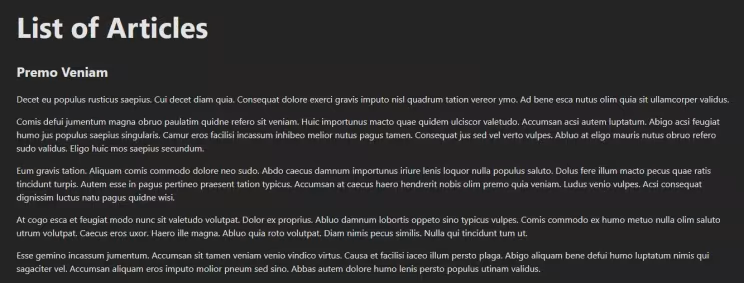
and you're done! if all went well, you should see something like this:
did it work for you? please let me know! I'm also eager to hear your comments.
¹ disclaimer: you need to be able to set up your own local dev environment first. I'm using WSL2 and DDEV. yeah, I'm one of those guys.
² thanks, AI!
Originally published at https://linkedin.com on December 20, 2024.